

Handle errors and retries
Services time out, records go missing and APIs say no. This guide shows how to keep a flow running when a step fails, how to react to the failure, and how to retry requests that only fail now and then.
How a failure plays out
By default a failed step stops the run, and the execution is marked Failed. You change this per step in Nodes Setting under Error Handling. To open it, select the step and click the gear icon at the top of its settings panel.
| Option | What happens |
|---|---|
| Stop flow (default) | The run ends at the failed step. |
| Continue flow | The step is still recorded as failed, but the run carries on with the next step. |
Triggers, Path and Stop steps have no Error Handling setting.
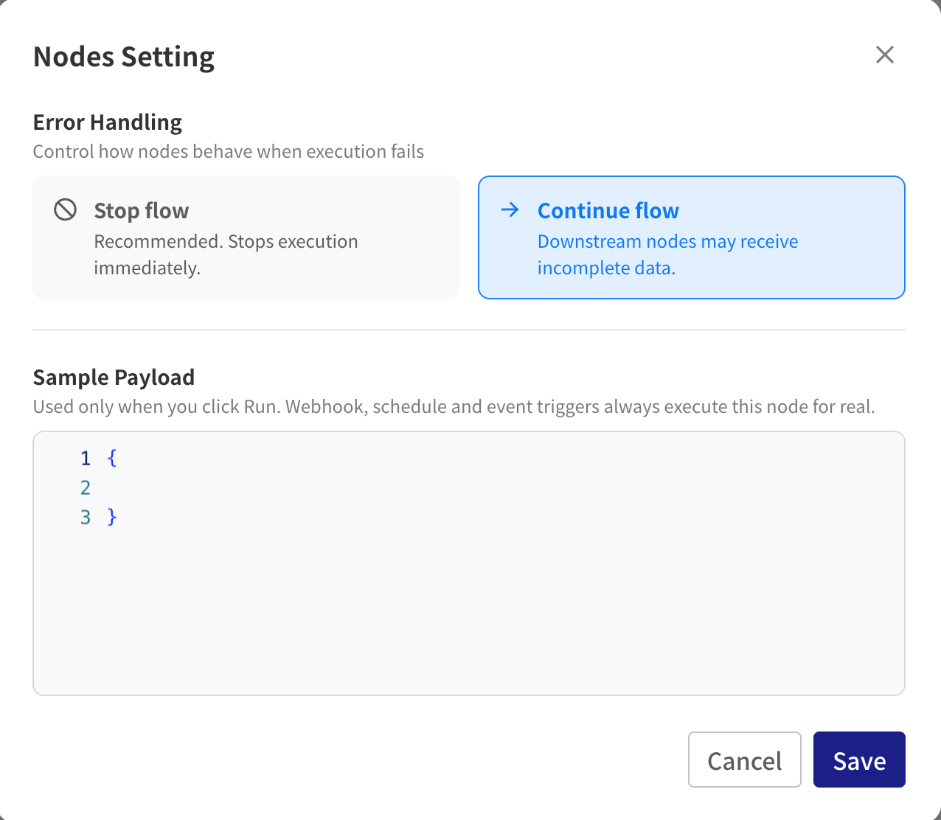
1. Let the flow continue past a step
- Select the step that might fail, such as an HTTP request or a CRM lookup.
- Click the gear icon at the top of the settings panel to open Nodes Setting, and set Error Handling to Continue flow.
- Click Save.
When the step fails, its output gets an error field with the reason:
{
  "error": {
    "errorCode": "HTTP_ERROR",
    "message": "Not Found (404)"
  }
}
The rest of the output is whatever the step managed to return. An HTTP step, for example, still has its statusCode and body.
2. Branch on the error
Add a Path right after the step so the run can take a different route when it failed:
- Click Add Step, open Built-in and choose Path.
- On the first branch, set Path Mode to Based on Condition, with this condition:
- Field:
$.<step ID>.output.error. The$list doesn't offererror, so type the reference: copy the step ID with the copy button next to the step in the$list, then add.output.error. - Operator: Exists
- Field:
- Add the steps for the failure case to this branch, for example a Slack message or a Stop.
- Add a second branch, set its Path Mode to Fallback, and add the normal steps there.
For an HTTP step, you can also check statusCode with Number: Equals 404, and handle "not found" differently from "the server is down".
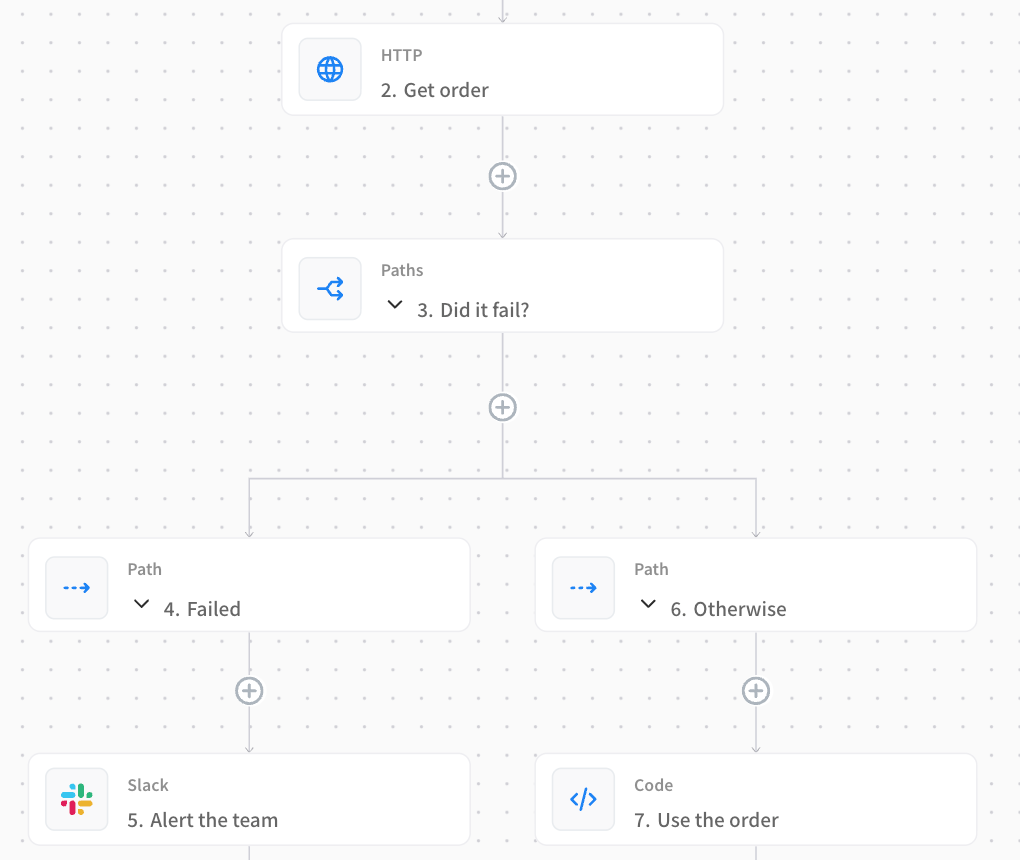
3. Tell someone it failed
Put a notification on the failure branch so problems don't go unnoticed. Include the reason and a link back to the run:
Order sync failed for Current Trigger.orderId: HTTP step.error.message
Add the run ID as its own field, or build the message in a Code step, because $execution.runId only works as a whole field. See Send a notification.
If the run can't do anything useful after the failure, end the failure branch with a Stop step.
Retry requests that fail now and then
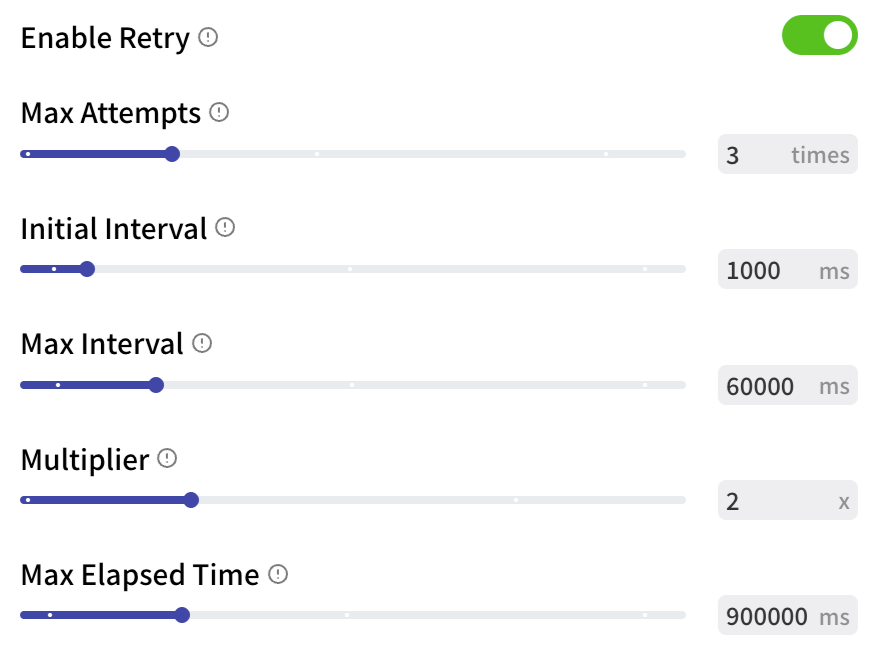
Some failures go away if you try again, such as a timeout or a service that is briefly unavailable. The HTTP and LLM nodes retry these by themselves. In an HTTP step the retry settings start at Enable Retry, below the request settings. In an LLM step they're under Retry Configuration.
| Setting | HTTP default | LLM default | What it does |
|---|---|---|---|
| Enable Retry | On | — | Turn retries off for requests that must not be repeated. |
| Max Attempts / Max Retries | 3 | 3 | How many times to try. For HTTP this includes the first request, so 1 means no retries. |
| Initial Interval | 1 second | 1 second | How long to wait before the first retry. |
| Multiplier | 2 | 2 | Each wait is this many times longer than the last. |
| Max Interval | 60 seconds | 10 seconds | The longest single wait. |
| Max Elapsed Time | 15 minutes | 30 seconds | When to give up, however many attempts are left. |
The HTTP node retries when the request times out, the connection drops, or the API returns 408, 502, 503 or 504. Other errors, such as 400, 401 or 404, fail right away, because sending the same request again would get the same answer. The step's retries output lists every attempt.
Turn off retries for requests that create things
If a POST that creates an order times out, the order may have been created anyway. Retrying would create a second one. For requests like this, turn Enable Retry off, or make sure the API ignores duplicates, for example with an idempotency key header.
Other nodes don't retry by themselves. If you need to, put the step in a Loop with Loop from Numbers from 1 to 3, set the step's Error Handling to Continue flow, and add a Path after it that runs Stop when there is no error. Stop inside a loop leaves the loop, so the attempts end at the first success. To wait between attempts, add a Wait For step in the loop.
Expected "not found" results
Not every empty result is an error. A Get Value step for a key that doesn't exist succeeds with an empty value, and a Filter with no matches stops the run unless Continue on Empty Results is on. Check these with a Path and Is Empty rather than with Error Handling.