

Call a subflow
When several flows need the same steps, such as checking an order's risk or looking up a customer, build them once as a sub-flow and call it from any flow. The sub-flow takes inputs, does its work and returns values, like a function.
1. Build the sub-flow
- Create a flow, and choose Built-in › Sub Flow › Start Sub Flow as its trigger.
- In Input Parameters Schema, add the name of each value the sub-flow needs, such as
orderIdandamount. - Add the steps. They read the inputs from the trigger: type
$, choose Current Trigger, thenparams, for example$trigger.output.params.amount. - End with Built-in › Sub Flow › Return from Sub Flow. In Output Values, add each value to send back, such as
riskScoreset to a reference to the step that computed it. - Publish the sub-flow, and keep it enabled.
2. Call it
- In the other flow, click Add Step, open Built-in, choose Sub Flow, then Call Sub Flow.
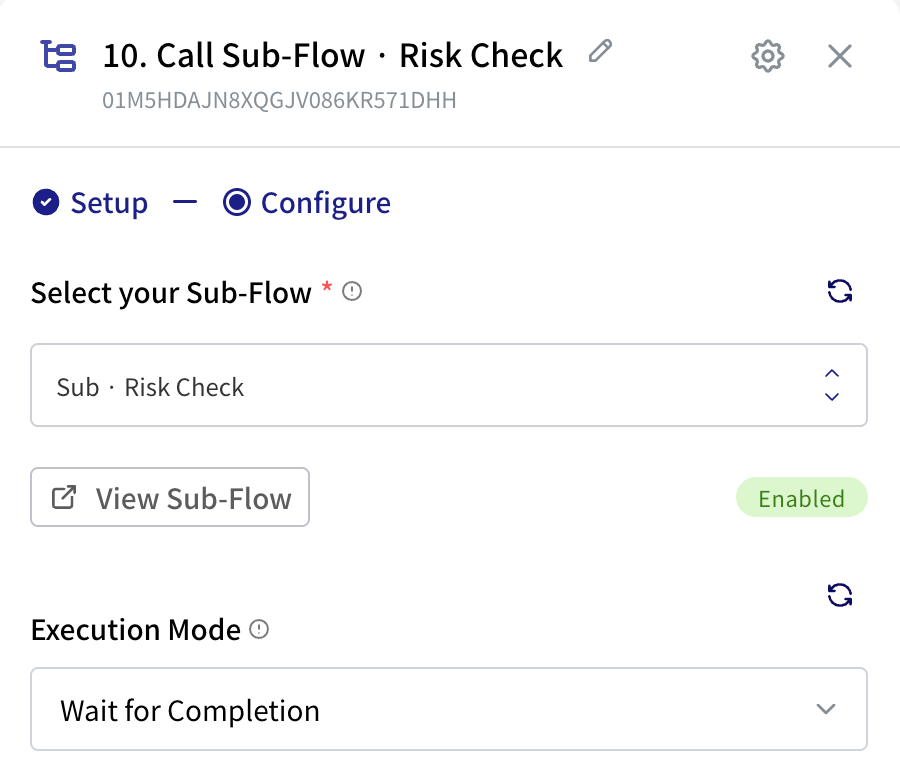
- In Select your Sub-Flow, pick the sub-flow. Only flows with a Start Sub Flow trigger are listed. View Sub-Flow opens it in a new tab.
- Fill in Input Parameters. There's one field for each name in the sub-flow's Input Parameters Schema.
- Choose an Execution Mode:
- Wait for Completion (default): this flow pauses until the sub-flow returns.
- Fire and Forget: start the sub-flow and carry on straight away. Use it when you don't need the result.
3. Use what it returns
With Wait for Completion, the values from Return from Sub Flow appear in the Call Sub Flow step's output, under the names you gave them. So a returned riskScore is:
$.<Call Sub Flow step ID>.output.riskScoreThe output also has:
| Field | Meaning |
|---|---|
subFlowCompleted | true when the sub-flow reached Return from Sub Flow. |
subFlowRunId | The sub-flow's run, for finding it in Executions. |
subFlowFailed, failureReason | Set when the sub-flow failed. You'll only see these if the Call Sub Flow step's Error Handling is Continue flow. Otherwise a failed sub-flow stops this flow too. |
Which version runs
| How the calling flow runs | Sub-flow version that runs |
|---|---|
| From its trigger (live) | The sub-flow's published version. |
| With Run in the editor (testing) | The sub-flow's current draft, so you can test changes to both flows together before publishing. |
Remember to publish the sub-flow after you change it, or live runs keep using the old version.
Good to know
- Sub-flows can call other sub-flows.
- A sub-flow is a good place for steps that would otherwise need a loop inside a loop: loop in the calling flow, and loop again inside the sub-flow.
- Each call runs as its own run, which you can open in Executions using
subFlowRunId.